
Season 03 | Episode 01: Accessibility and Travel
In this episode: David and Sandi talk with Richard Marion about accessibility and travel. We discuss the tools Richard uses to plan his trips, what works well and what doesn’t, and gain insights into how technology is transforming travel for people with disabilities.
Transcript
David: Hello, and welcome to Practical Accessibility Insights. I’m David Best, and with me is my co-host, Sandi Gauder. Hi, Sandi.
Sandi: Hi, David. How are you doing today?
David: I’m good. But you know, as we record this, we’re coming to the end of September, which means the end of summer.
Sandi: Yeah, let’s not go there.
David: You know, as they say, all good things must come to an end.
It’s been a good summer. Did you have a good summer?
Sandi: Oh, yes. Yes. And I’m hoping it lasts much longer than the end of September.
David: Well, in this episode, we’re turning our attention to travel and tourism. And in our society today, with political and economic upheaval, it’s a real challenge for small businesses and entrepreneurs to establish a footing in the business of commerce.
So what we wanna do is share some practical ideas for small business owners to expand their market by focusing on the people they serve. So Sandi, why don’t you go ahead and introduce our guest for today?
Sandi: I’d be happy to do that, David. So our guest today is Richard Marion. And as David mentioned, we are gonna be focusing this podcast on travel, and Richard has been on some trips recently, and is going to talk to us about what went smoothly and maybe what didn’t go so smoothly on his travels.
So Richard, welcome to the podcast.
Richard: Thank you very much. It’s great to be here.
Sandi: So maybe you could start by telling us and our listeners a little bit about yourself, you know, your background, and then we’ll get into some questions about your experience with travel.
Richard: My background is that I’ve been blind all my life, so I have been involved in disability advocacy related issues for 35-plus years, and now more recently, focus on digital accessibility and web accessibility issues, some transportation issues as well.
Prior to actually working in accessibility, I actually… Funny you mentioned a small business. I worked in a small family-run business as basically doing the administration work for 20-plus years, but decided I wanted a change, and, and decided to turn my volunteer work into some paid work, and, and now do consulting, mainly on screen reader accessibility for websites and applications.
And then I’ve done work for our public transit agency for three years as well, too, in the, as the accessibility coordinator.
Sandi: So you’ve got lots of experience dealing with people who are trying to solve some problems around digital accessibility and transportation accessibility. So maybe you can tell us a bit about some of your recent travel experiences.
You know, what kind of trips you were taking. You know, were you flying? Was somebody driving you around? And how you went about planning those trips so that they went as smoothly as possible for you.
Richard: Over the last couple years, for example, I’ve done some traveling partly for business and mostly for pleasure these days.
And so a lot of the planning tools I’ve used are standard applications that are available to other people, like travel booking websites, AI, AI assistants like ChatGPT or Gemini for sort of inquiring about destinations and maybe even assisting with scheduling and travel logistics as well too. Then some of the tools that I use when at destinations would, would be things like Aira, which is the, an app for people who are blind that actually get, provide the assistance of a live visual interpreter through your camera on your phone or, and nowadays with me, my Meta smart glasses.
So that’s the kinds of things I’ve been using, and the accessibility challenges sort of vary from app to app as well.
Sandi: We tend to focus on you know, the bumps, the things that, that cause you problems using technology. Have there been any apps or websites or tools that you’ve come across that have been just so easy and effortless to use that maybe surprised you at how smoothly things went?
Richard: Yes. I’ve used the Expedia app to do a lot of my personal bookings for hotels and, and flights that aren’t with the sort of the two major carriers in Canada. It’s been surprisingly quite accessible. There’s a, a few minor glitches when you’re looking at specific listings for properties, but overall it’s, it’s been quite accessible, and I’ve been able to do it independently on my own for a few years now.
The other app that was surprising was when on our last trip, we, we spent some time in the UK so specifically Scotland and England, and then have spent a few days in Paris, France. I was surprised that the app for booking European train lines was quite accessible. And so I was able to book my train tickets, and also the application process to apply for a disability rail card in the UK.
The actual application process and the app used to apply for it was quite accessible. The, the process itself had a bit of a bump. They originally denied my application, but I did the appeal. The filling out the appeal was done online, and all the forms were readable with a screen reader.
Sandi: That’s very positive, because those sound like pretty complex websites or applications, and the fact that you were able to use them without too many bumps is really a great thing.
And it, and it speaks to the fact that it can be done. I mean, a lot of people think, oh no, this … it’s impossible to do this. No, it’s not. It just takes some thinking and some planning to get it done right. So let’s flip the coin. With apps or websites that were challenging, are there consistent issues that you encounter when you’re using digital technology for travel?
Is it the same kind of thing over and over and over again, or does it seem to vary depending on the app or the website that you’re using?
Richard: I would say it’s … some things are fairly consistent. Definitely the issue with unlabeled screen reader controls, so like not being able to find buttons and controls, different experiences using a PC versus your mobile device, which is common with every app.
For example, I had to try to book something in the United Kingdom that I needed to use a specific app for, it didn’t work on the international version, so I had to actually switch to the localized version in the UK to do the booking, which was actually more accessible. So those kinds of things were also an issue as well, too.
It seemed kinda like where they had a duty to be become more accessible, they, they did it, but didn’t transfer it to the international version where they probably had less of a duty to be more accessible. And I found, in this case it was the LNER website for London Northeastern Rail, it turned out that their international booking site was on a legacy platform that they hadn’t actually changed because they didn’t have to.
I guess that was the case. And whereas the, when I switched to the UK residence version, which billed me in pounds as opposed to US or Canadian dollars, it was more accessible because they had to change their platform to comply with their accessibility legislation.
Sandi: Now, you sound like a person who’s a bit techy.
You’re obviously out there trying all the latest and greatest things. So it kinda sounds logical to me that you would go from the UK version to switch to a different international version to try and get things to work. But for somebody who may be not quite so tech-savvy, would they just end up being stuck, do you think?
What would you recommend for those kinds of folks who may not be as adventurous as you are with technology?
Richard: I would say yes, they would, they definitely would end up being stuck because travel websites and things may be uh, close to being fully screen reader accessible, but they may not be user friendly.
Like, the, the user experience can be quite challenging and complicated, and if you’re not prepared for that, then you can be stuck. So I would say that if a business is looking to support people who are traveling as a niche market, that they offer maybe the ability to contact them directly so they can get some assistance with booking.
I’m a fairly experienced traveler, so I, I’ve tended not to use a travel agent, but often will tell people that are kind of planning sort of major overseas excursions that they may want to get the assistance of a travel agent, and finding a travel agent that has experience in dealing with people with disabilities.
I’m not sure if there’s any in Canada. There’s probably a few, especially people with disabilities that want to do general travel and not specifically tours and groups specifically for people who are blind or people with other disabilities.
I think having someone available to you that has that experience that can kind of assist you with navigating the ever-increasingly online world of booking things and getting boarding passes and checking into your hotels and things like that as well, that’s a bit of market area that still needs to be utilized because I think that especially older people may, may not be as comfortable with technology as people that have grown up with it, like anyone that’s my age or younger.
Sandi: We’ve talked about the apps that you use and websites to, like, book things or get from point A to point B, but what about the places that you wanted to get to, you know, the, the tourist attractions, for lack of a better word, or the hotels that you were staying at, were you able to, or were you even looking for accessibility features for those destinations?
Richard: So on our last trip, yes and no. So our main criteria is close to public transit. When we booked in cities, we booked at places that, as far as we could tell without having any local contact in two of the three cities, that it was actually in an area that would be easily accessible to the, to main tourist attractions from either by walking or taking the Tube or the tram in, in Edinburgh, or buses as well.
The accessibility features of the buildings themselves, we didn’t really look for that. Our first hotel, actually, the only thing I had requested, because the building had no elevator, was that our room be on the ground floor, and they, they were able to accommodate that. But everything else, it wasn’t as critical in, in that sense, because I was, in this last case of, of traveling overseas for, for vacation, I was traveling with my sighted spouse, so I wasn’t as concerned about braille or large print room signs and things like that, like, as, as I would be if I was traveling on my own for pleasure or business.
Sandi: So when you’ve been traveling on your own and you’re looking for that kind of information, is it easy to find? Do hotels or any of these destinations, do they make it easy for you to find out whether it’s gonna be easy for you to navigate the building or the attraction? Do you have to put a lot of work into finding out what’s there once you get there?
Richard: You kind of do. Like especially in Canada, it’s hard to find accessibility information about the building. Even in Europe, we didn’t know that our hotel in Paris, for example, had one of those automated elevators where you had to actually select your floor and then wait for the elevator to arrive, your specific elevator to arrive.
So in a lot of new buildings now, there’s elevators that you basically approach a touch screen and select your floor, and then it tells you Elevator D is going to your destination. So in this case, in our hotel, it had six elevators, so you had to kind of know where Elevator D was as well, too. And even those, these machines have an accessibility setting, it’s very cumbersome and difficult to use, especially on a building with 30-plus floors.
And, you know, let’s say if your room’s on the 25th floor, it takes a while to find the 25th floor because you have to keep pushing the button until you hear the screen reader tell you that it’s the 25th floor. So you can take 10 minutes to even select your floor, and then by the time you do it, you still might miss the elevator because it may not give you really accurate directions on how to find the specific elevator car.
I did notice with other tourist attractions, especially some of the historic sites, the accessibility page was very prevalent on the main page of the website. It clearly told you what accessibility services were available. For example, how to arrange for touch tours and how to request the audio guide that had more specific information for patrons that were blind as well, too.
So that was readily available. Much, much easier to find than it would be here, say, at museums and historic sites that weren’t specifically focused on, say, disability or human rights like the Human Rights Museum in Winnipeg. That, that’s probably the one exception because of its kind of exhibits it has.
Sandi: So you notice the difference between traveling in Canada or North America versus traveling in Europe as far as what’s available from an accessibility standpoint.
Richard: I think the at least being able to find what’s available and how to access it was, was much easier to sort of find and request. Like, even if you were purchasing tickets online, you could purchase your disabled patrons or customer’s ticket with a guide or a carer, as it’s called in the UK, or an attendant at the discounted rates, and it did tell you what they may ask when you approach the gates.
More than 90% of the time they never bothered asking for a disability ID to prove that you were eligible for the discount. Like the, it seemed like in my case, the … I have a guide dog, but I didn’t travel overseas with her, so it seemed like in our case that, that my white cane was, was enough proof that I really did have the disability I indicated having when, when purchasing discounted tickets for myself and a guide.
Sandi: So you mentioned your Meta glasses. Did you take them on the trip? And if you did, how did you use them? How did they work?
Richard: I took them on this trip, but I actually didn’t use them on this trip, and I should have because I know in the, the UK, I think there’s some more, there’s a bit more restrictions on, on asking them, like, for describing scenes and things because of privacy concerns.
So I think partly the reason why I didn’t, because uh, some colleagues in the UK said they’ve had trouble getting their Meta glasses to do what their friends in North America will tell them that they can do. But when I’ve traveled on my own, I do use them to sort of help me get through the airport here.
Our airport is a paid zone for Aira, so I’ve used my Meta glasses with Aira to get from security to my gates. I’ve used Meta glasses if I’m in a hotel room to describe different bottles of shampoo, conditioner, and body wash in the washroom , things like that. I’ve also used it to help me identify which pods are the decaf and which ones are regular.
I’ve also used it to use them to read menus and things in restaurants that, which works really well.
Sandi: Technology’s amazing. If it’s done well, it can just be a total game changer for so many people. Yeah, it’s wonderful.
David: Richard, for our listeners that really don’t know what a screen reader is, can you explain what an accessible website is?
What does that mean in terms of you trying to navigate a page using the keyboard or touch gestures? What page structures do you follow, and what kind of webpage elements like, you know, carousels, tab panels, menus, cause problems if they’re not designed properly, and what sort of things do you look for?
Richard: Yeah. So a screen reader is, is kind of exactly how it sounds. So it reads the content of the screen, but takes the content, in this case a webpage, and turns it into synthesized speech. So what happens when a webpage load, it loads, depending on the screen reader, it’ll actually tell you how many elements on the page or how many links there are, headings sometimes, and other structures like frames or landmarks as well, too.
So the things that I look for that I utilize in webpages, a lot of times I’ll use the skip to content buttons when they’re available, so I can sort of bypass those menus and pull-down menus at the top in the, in the menu bar and the banner as well, too, and get straight to the content.
The other thing that I use is headings. I will actually use my heading command. So a well-structured pages with headings would have heading level one as its main sort of content area, and then heading level twos as the subcontent areas and, and maybe threes, sometimes fours.
The carousels can be problematic for a screen reader because sometimes if they auto-advance, in some case take focus away from what the person’s reading with their screen reader and jump back up to that carousel. So having carousels that don’t auto-advance and have sort of buttons and controls to turn them more into slideshows so you can advance and rewind them is really critical as well.
Having button controls are actually marked with the label that it is visually on the screen is important. So, like, if I see something that says submit button, if it just says button, I don’t know that, but even though the graphic on the screen shows submit, so it’s, it’s really important that the button label is, is reflects what’s on the screen.
David: So in your experience in doing your own research for itinerary and travel what kind of experience have you had with those websites that you had sort of problems with in getting support, and what would you recommend that travel agencies do to provide you with support when you’re having trouble?
Richard: If the business, especially if it’s a small business, if they can provide a phone number or, or at least a contact us email address that actually will allow someone in the organization that’s familiar with some accessibility issues to at least assist the person with completing the booking or at least making note of the issues that the person’s experiencing so they can fix it on their next revision of their website.
So 90% of the time they’ll email you the itinerary. So the only paper we have was the stuff that we printed just to keep in our luggage in case our luggage got lost as, as well. But we had no physical boarding passes for, and we were actually showing tickets to get onto trains and airplanes even too.
David: So was that content sent to you in a PDF document?
Richard: It’s sent in a PDF. I was able to read the content of the PDF because it was, it was text readable with the screen reader. But PDFs are something that a lot of people don’t like and are kind of scared of. Having an alternate to a PDF would be useful as well too, like maybe a link to an accessible version of the document, or at least a link to an HTML version of the same document.
Some cases the document was an HTML document, and then there would be a link in the document says, “Add this boarding pass to your Apple Wallet or Google Wallet”.
Sandi: One of the things we don’t often talk about is the language, the writing that goes with all this stuff. Sometimes travel terminology might be terminology we’re not necessarily, we don’t use every day when we have conversations. So in your experience, do people in the travel industry, tourism industry describe things clearly? Do they make sense, or do you get these documents and go, “I have no idea what you’re talking about. Could you maybe put it into plain English for me?”
Even itineraries, sometimes they’re not necessarily clear, you know, what time the train’s departing or what time maybe you need to be there. They might be using common words, but they don’t express it in a clear enough manner. Does that ever become an issue for you?
Richard: It usually makes sense to me, but I’ve had a lot of experience in this area, so I don’t know if that would be the case with, with a lot of people, if it would make sense. That was an issue with, especially with train travel.
There was just basically your train departure time and no sort of indication that you should arrive half an hour or an hour or whatever it would’ve been for any given train before your departure. That, I had to sort of find by reading sort of other travelers’ reviews or suggestions, and even anything that I ask AI information about.
So for example, because the UK’s not in the EU, Eurostar, it said, “Arrive early at the train station,” but it didn’t say how early, and I had to sort of read other travelers’ suggestions that I should be arriving an hour and a half before the train, because now when you’re leaving London, there’s export control.
Then there’s an actual EU customs checkpoint at the station because you’re leaving the UK and entering the EU. Of course, until a few years ago, that wasn’t the case.
David: Yeah. I know sometimes they use acronyms and special codes that the screen reader doesn’t read very well.
Richard: I did so find myself when you’d see these codes, I’d have to stop the screen reader.
So if I was reading it with my iPhone, I’d turn the router, which … So the router is a thing that, for people that don’t know, is a, a thing that allows you to change your touch screen screen reader into ways to reading characters, lines, and words or headings or other controls. And so I would change it to characters, so I would hear it go A, alpha, B, beta, like, just so you kinda knew, and then you kind of think, “Okay, that code must mean something to do with departure time,” or something like that.
David: And that really slows things down.
Sandi: You talked about using AI as well in your planning. How much has AI helped, not just in travel, but just in general? Do you use it fairly often? What does it do well? Have you run into accessibility issues even trying to use AI?
Richard: I think the one thing it does well, it does research quite well.
Every once in a while, I’ll catch it because it’ll say something that you kinda know that isn’t right, and then you have to verify it yourself or ask it to check its facts again. I haven’t experienced as many accessibility issues with, with it. In the past, especially with the early versions of ChatGPT or Copilot, it was hard to find where you were in the text string, ’cause the screen reader was reading it basically like it does with chatbots on webpages, and it wasn’t actually, like, reading the responses out automatically when you’d get them.
But now with the AI apps for smartphones, it seems to be reading the responses more. It formats fairly well. Like, sometimes when it spews out a table, it’s, it’s not formatted correctly for a screen reader, and you kinda have to sort of read it line by line to get an idea of what it actually done for you.
I did it initially was because I had to ask the AIs about accessibility service at various site, but then when I would go to their websites again, I did find that the accessibility page was fairly prominent. Now, the AI was pretty much mostly accurate about what accessibility features were available at the tourist sites in overseas.
Having said that, not the case here, ’cause a, a recent trip to Vancouver Island, we went to a museum, and ChatGPT said what accessibility services were available at the site, and they didn’t actually exist. And what I should have done was verified it myself, ’cause it, it was it was, it was clearly wrong in that case.
David: I haven’t done much traveling in recent years, but when I was in the corporate world, I did a lot of traveling, and I found that in most cases people were very helpful. Very rarely did I have situations where I couldn’t get the help I needed. But I found that with the technology, even though it was very primitive, that it helped me become independent in my travel.
I’m just wondering if with your experience, what’s the balance, the trade-off with getting your independence in using the technology and depending on the people that you encounter.
Richard: People you generally encounter are really helpful. Service staff or just the general public are really helpful, especially in cities that are, in a lot of cases, more friendly than, say, some other place some places in North America.
For me, the technology, for example, having to use something like Aira, which is, like, the virtual assistant where you’re actually still dealing with a real person, but they’re online with you in some other location, makes airports a much more pleasant experience. So having someone that’s dedicated to you, even though it’s, you’re, you’re listening to through a headset and they’re watching you where you’re going through your camera on your glasses or your phone, because they can spend as much time with you as you want.
So you can even stop at the store and pick up something in, on your way to your gate and things like that. The airline staff were always willing to do that, but you, you just had this feeling that you were taking them away from something else that was more important as well.
Sandi: When you are traveling, especially if you’re traveling to a foreign country that has a different language that you’re not familiar with, does that ever pop into your head?
Richard: It does, and probably more so out on the street when I’ve been overseas on my own. Like, I, I tended not to interact with other people, and I was a, a little more careful because you had, you had no clue who, what their intentions were. But I was pickpocketed one time in, in Switzerland, and it’s kind of unnerving.
And after that, I even got more cautious about approaching people on the street because you just never knew. I tended to stay closer to my hotel and, and more often I would, would ask hotel staff like, how to get places, and they usually were pretty good about giving specific directions. Especially in Europe, most of the countries, most people know English as well as their country’s sort of national language or native language as well.
Sandi: Right. And I guess navigation apps don’t have a feature that says, this route is a well-lit, well-traveled route as opposed to this one that might take you down a back alley that might be a little bit suspect.
Richard: No, and that would be a useful tool, like especially if that information could be updated within the app based on crowdsourced information, this route is not as safe as it may indicate.
And I’ve seen crowdsourcing on the transit app. It’ll crowdsource information about conditions on buses or trains and how busy they are.
David: Yeah, there is a growing interest in OpenStreetMaps, particularly in Canada, and what we need to do is get more people to input the accessibility features in the OpenStreetMaps, ’cause quite often on OpenStreetMaps it shows pictures of things like an intersection, but it doesn’t really tell us if there’s an audible signal at that intersection, or if it’s four lanes, or if there’s a turn lane.
And those things can be added, and what we need to do is get more people involved with adding those kind of features into OpenStreetMap, so when we use the GPS guidance systems, it can pick that information up.
Richard: Yeah, ‘ cause most people are gonna be using OpenStreetMaps or, or Apple Maps or Google Maps.
David: So with your experience, I’m just wondering, technology is great.
Technology is still emerging and being developed, and it’s imperfect, but it is helpful. What is your expectations and hope for the future in the development of AI navigation?
Richard: My hope for the future is that we’ll see a, a time when the AI … that you will be able to use AI to sort of guide you through places.
It’ll tell you what’s around you and that you’re approaching objects. And if it’s on board the device, there wouldn’t be this, the latency of, of apps and things that still utilize the cloud because that’s been the main danger of utilizing AI to sort of describe your surrounding environment on the fly.
So it may tell you there’s a flight of stairs in front of you as you’re falling down the stairs. So that’s my hope for the future, that it gets to the point where, where it actually can be relied on to sort of give you a, a play-by-play of what’s happening around as you’re walking as well.
If I’m walking down the street, I don’t wanna know about every tree that I’ve passed, but I may want to know that there’s a sandwich board in, in front of a building. So it would kinda tell me that kind stuff. And then also as the information about that I’ve approached an intersection, there’s an audible signal. “Your pedestrian button is located here.” Like, I don’t wanna know about every parked car that I’m passing and things like that.
David: So Richard, I wanna thank you so much for joining us and sharing your experiences in the, the area of travel and tourism.
Do you have any resources or any contact information you’d like to share with our listeners if they’re interested in looking up and learning more?
Richard: There’s travel organizations specifically with, for people who are blind. So like a company in the United Kingdom that strictly does blind and sighted sort of group travel.
It’s called Traveleyes. It’s Traveleyes International. So if you just wanna read more about people’s personal experience with traveling and how they utilize technology and tools or the experience they had, the Blind Canadians blog has quite a few articles on travel over the last year or so. And that’s just at BlindCanadians.ca.
Then you could just Google accessible travel and you’ll find there’s lots of resources out there.
Sandi: Well, Richard, I wanna thank you very much for joining us today. It’s been great to travel virtually on your trips and to hear about the things that worked well and what hasn’t worked so well.
Before we go, we like to ask all of our guests the same question and that’s, what is one tip that you can leave our listeners with about providing travel services for people with disabilities? Something practical that they can take away.
Richard: The one thing I would say is be open to help guiding them through the process. For example, doing things like online check-in for cruises. Just go that extra mile and more often than not, those people have friends and they’re gonna say, “I worked with this agent at this company and they provided me excellent service and really assisted me with making my experience enjoyable right from booking.”
Sandi: So thanks again, Richard, for joining us today on the podcast. And I hope your next travel destination is exotic and you get there safe and sound. Thanks again.
David: The views, thoughts and opinions expressed on this podcast.
Are the speakers own and do not necessarily represent those of the podcast team and partners. This podcast is for information and learning purposes only. The Practical Accessibility Insights podcast is hosted by CMS Web Solutions. The intent of this podcast is to raise awareness for practical advice and strategies for making digital and physical environments more accessible to everyone.
Thank you for joining us in this time of discovery and sharing for a more inclusive society. If you have questions or comments, you can email us at info, I N F O, at david dot best or Sandi, S A N D I, at CMS Web Solutions dot com. For more information and resources, go to www.CMSWebSolutions.com or www.BestAccessibility.consulting.
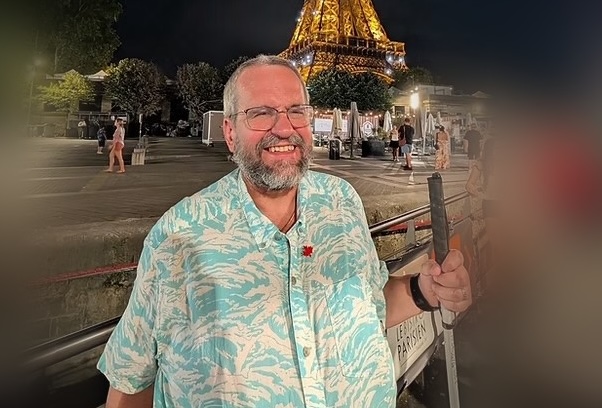
Guest Speaker
Richard Marion
Richard, a Metis individual who is blind and identifies as part of the 2sLGBTQIA+ community, has dedicated his adult life to advocating for improved accessibility and equality for people with disabilities.
As a person with a disability, Richard addresses various issues through his personal experiences. Over the years, he has been actively involved in numerous accessibility projects. Recently, Richard has played a pivotal role in enhancing the accessibility of bus stops for individuals who are blind or partially sighted by serving as a technical advisor on the Braille used on the recently installed Tactile bus stop signs across the TransLink service area.
Presently, Richard dedicates most of his time to conducting website accessibility testing for various organizations. He also spends time helping to strengthen the role people with disabilities can play on various advisory committees mandated by the Accessible BC Act.