
Season 02 | Episode 02: Eugene Woo on Driving Accessibility in Design Tools
In this episode: Eugene Woo, founder of Venngage, talks about the journey of making design tools more accessible. Discover how Venngage weaves accessibility into their platform and the impact this has on small business owners and educators alike.
Transcript
David: Welcome to Practical Accessibility Insights. I’m David Best, and with me is my co-host, Sandi Gauder. Hi Sandi.
Sandi: Hi David. How are you today?
David: I’m good. And you know, it’s sad to see summer go, but we still have some nice weather. Did you have a good summer?
Sandi: I can’t complain. I can’t. Nice and sunny, so, yep. All good.
David: So what we now into our second season? Amazing. We actually got through first season, and now we’re into the second podcast of our second season. So Sandi, why don’t you give a bit of a blurb in what the second season is all about and then introduce our guest for today.
Sandi: I will do that. So the last season, we sort of set up the foundation for Practical Accessibility Insights.
We talked about just the general concepts around accessibility, looked at accessibility in various areas of education. This year, we’re taking more of an approach that’s focused on entrepreneurs and small business owners. We’re talking with a variety of people over this coming season who may have a disability, may not have a disability but accessibility has certainly influenced how they do their work and how their company operates.
So that’s gonna be the focus for the next few episodes. And today we have someone who exactly fits that bill. We have Eugene Woo, who is the CEO and founder of Venngage joining us today, and I’d like to welcome Eugene to the show.
Hi Eugene.
Eugene: Hi Sandi. Hi Dave. Thank you for having me. I’m pretty excited.
Sandi: Thanks for joining us. I’m really excited. And we’ve chatted before on your podcast, so it’s kind of nice to close the loop and, and let me ask you all the questions, interrogate this time. So before we get into those questions, why don’t you give our audience just a brief overview of who you are, your company, and what it’s all about.
Eugene: Sure. So I’m Eugene. I have a background in software engineering, and about 13 years ago started a company called Venngage. And you know, that’s the company that I still run today. And Venngage is a design, uh, tool. It’s very similar to Canva, but it has a large, like suite of accessibility features that, you know, Canva and other design tools don’t have.
So one of our unique differentiators is the ability to actually export accessible designs, accessible PDFs. I’m also based in like Southern Ontario in Toronto, what we call the greater Toronto land area. So, so it’s great.
Sandi: So how is it that you decided that you wanted to focus on accessibility with your tool?
I mean, you talked about Canva, which everybody seems to like to use, but delivering accessible content is a whole other level, especially with something that’s a design tool and something that delivers, you know, graphic intense output. So what triggered that interest or the desire to get your product to be something that delivers accessible documents and graphics?
Eugene: So we are a small business, I think compared to, obviously compared to Canva and to Adobe and to a lot of these other design tools. We’re a very small company. We’re about like 50 people. What we have to do as a small business, especially a small software business, is we kind of have to listen to our customers and really solve the problems that they have.
So I’ll, you know, I’ll be very honest, like I personally didn’t know a lot about accessibility, neither did the team. But what happened, you know, I would say, gosh, this is before COVID now. So more than five years ago, we still have had a lot of requests from people asking us, you know, how can they make their designs accessible?
And back then I would say most tools, it wasn’t out of the box. It was very difficult. I guess some of, if your audience know about accessibility, you would need a remediator, you need someone proficient in like Adobe or something to kind of fix everything in that document to make it accessible. It was a very big process.
So they were asking us, can I just, you know, click on a button and export an accessible PDF, or how do I make this accessible more generically? So that voice sort of became louder and louder over time when, you know, when we were evaluating, you know, what can we do for our customers? You know what make made sense accessibility was, was one of those things that really makes sense, especially in the time where we were noticing even the big, the bigger players like Canva and Adobe wasn’t paying attention to it.
And so we would hear the complaints all the time that, oh, Canva, like it’s great, but it’s not accessible. You still have to go fix it. Same with Adobe tools, same with all the other, you know, I would say smaller companies.
To be honest, it was both opportunistic and also, Hey, we wanna serve our customers and let’s give them something that no one else has.
David: Eugene, can you give us some idea what customers you have and what sectors they come from?
Eugene: The majority of our customers are small business customers. Unfortunately, they’re not the ones asking about accessibility, but the vast majority are small business customers.
So this is from a solopreneur and someone like you, Sandi, and, uh, you know, all the way to, you know, mom and pops, uh, you know, family businesses. So I would say that’s our core audience. And then we have a smaller market around students and, uh, people in government and higher ed. That market is the one that are primarily asking us about accessibility and who are concerned about accessibility.
Sandi: That makes sense because we’re all in the province of Ontario and we have the Ontario legislation that, you know, kind of drives the municipalities, local governments a little bit more so than smaller businesses. You know, smaller businesses kind of float under the radar, so to speak, with that legislation.
So it kind of makes sense that people looking for accessibility would be educational institutions, municipalities, all those kind of things because they’re more, they’re legislatively sensitive. Right?
David: What level of awareness typically do your customers have and how much education of accessibility do you have to do?
Eugene: That is depends. I would say the, on the non higher ed, the non university, non-government, uh, customers. So the vast majority of our customers, the small business, I would say it’s close to zero. They don’t really have a lot of awareness. And the reason I say that is because we would put a button in there that says, check your accessibility, and nobody would click on it.
So we also measured it. So it’s, you know, this is like a very honest answer because we measure it and we realize nobody even knows what this is about. Obviously on the higher ed side, I would say now I would say, you know, maybe 50% of them would know at least a little bit about digital accessibility.
And then I would say out of that 50% there’s, you know, maybe like 20 percent that knows a lot about digital accessibility. Because we have become sort of a primary like tool for a lot of these, uh, universities in higher ed that are asking for accessibility. So we do now get folks who are really, really educated about accessibility, who come in and they test all our features and all of that.
So we’re one of the few companies that actually have people know about accessibility come in and test it really well and tell us like, oh, this is not right, tagging it is wrong, blah, blah, blah, whatever.
Sandi: So can somebody use your tool to create a lovely infographic and publish it without the accessibility feature, or have you made it so that you can’t publish a document until you’ve done an accessibility check of what you’ve created?
Eugene: No, we don’t enforce the accessibility checker on everyone. However, by default out of the box, they are accessible. But once you edit it and you, you know, move things around, you’re adding images and all that, then that’s when things get messed up. So, outta the box is actually the templates. If you just open a template, click download, that’s a hundred percent accessible.
But when you edit it, then you’re introducing a bunch of content in there that may not be accessible. So, that depends on the user. So our normal colour picker, like the one that everyone uses, has an accessibility colour contrast checker in there, and it gives you the ratios. It warns you if it’s not accessible, you know, if it’s too low of a contrast and that’s out the box and that’s for everyone.
So if you didn’t know about it, you’re still getting it. To your point is like, we also wanted to educate some of our users because the vast majority of users don’t know about accessibility. So we, we did write about a bunch of help articles that kind of explains accessibility to why is it important and what is it for?
And we try and get them to click on it, you know, uh, in, in the tool.
Sandi: What have been your biggest hurdles in trying to implement these accessibility features into your software? Was it more just understanding what digital accessibility was all about in the first place? And then once you understand, it becomes easier to implement.
I guess you have to know the problem before you can fix it, right?
Eugene: So yes, the first challenge obviously is understanding the, the requirements, but I think that’s pretty clear. There’s, you know, the, WCAG standard. So I think it’s very clear what the output has to be, but it’s actually technically very, very difficult to make it work.
And that’s why like even big companies, billion dollar companies like Canva and, and Adobe, like even they have struggled to do it. It’s not like they don’t wanna do it. Like I’ve heard many times from Canva. Like they, they wanna make their stuff accessible, but that’s also because it’s actually technically very, really difficult.
The only way we were able to do that was because we did a rebuild of our platform, so we rewrote it from scratch, and when we were doing that, we were like. You know what? Let’s make it accessible. Let’s structure it in a way that will allow for us to make it accessible, because it’s almost impossible, it would take a, you know, a massive Herculean effort to then convert these, these PDFs or whatever it is to be accessible, you know, which we know that our competitors are having a hard time because they’re still with their legacy platforms and just trying to patch it up.
And while they’re introducing more and more new things is very, very challenging.
Sandi: So I’m gonna ask the, the flavor of the day. Are you using AI to support any of this? Have you tried it? Is it working? Is it getting in the way?
Eugene: Initially, no. Uh, it was all just like handwritten code and we just have to figure anything out.
I mean, today, yes, today AI is a huge uh, part of the coding process. I would say AI writes a lot of the boilerplate, sort of the generic, you know, code that, that you would expect. And specifically we use AI now to generate alt texts for our images, for our charts. Also our diagrams. I think we we’re not the only ones.
I think lots of people do use AI to do that.
David: Digital accessibility, at least good digital accessibility is a journey. It takes time to learn, and I find that for the most part, most people wanna do the right thing, but they don’t understand the end user experience because they don’t have any direct contact.
They don’t have a disability themself. They don’t have a family member or a colleague that uses assistive technologies. I’m just curious, Eugene, what your experience is. I don’t know if you use assistive technologies yourself or if you have a colleague or a friend. What has your journey been in actually learning about the end user experience?
Eugene: I don’t use any assistive technology, so my journey has been when we made this commitment, we started with, right, let’s make the outputs accessible, then also make the platform accessible. Those are two different, like two different things. We did prioritize making the outputs accessible first because that was what our customers wanted.
Still in the process of making the platform itself like accessible, and as you said, it’s a journey. So we initially hired a firm to sort of teach us how to do it, and they brought in testers who had disabilities, who were using screen readers, and then we taught our team how to do it.
So me personally, I just use keyboard. Before that, I was a pure mouse user. So personally I would say I, yeah, I use a keyboard user. I know how to navigate with a keyboard. Uh, that’s the extent of my personal experience.
David: So I assume though a lot of your learning comes from feedback from your customers. So I was curious, do any of your customers have like an accessibility statement on their website and with feedback, and do they actually engage with people with disabilities and provide that information back to you?
Eugene: Yes. Like I mentioned before, the main customer that uses the accessibility features are higher ed, like university, so they have a, you know, very diverse student population and staff population as well. And so they’re very knowledgeable about accessibility and so they give us feedback a lot from their own testing and from their own usage.
I mean, every new customer we bring on, they will give us feedback.
Sandi: You’ve talked about your customers coming to you and kind of pushing you down this road or opening the door for you to go through when it comes to digital accessibility. Is there a particular project that sticks out or a particular experience with a customer that you would think of as like a real success story around using your tool and delivering accessible content for their users. And just did they ever share the experience with you or the impact that end product might have had for a student, let’s say, or whoever the, the end user was?
Eugene: Yeah, I can share, I know I’m allowed to share at least one example, so I would say it’s, and it’s a very typical example for our, uh, higher ed are our university customers. So a typical customer from the higher ed will have like the marketing team, and they’re creating infographics, posters, flyers, a lot of documents as well that are used for communicating with students and staff, both internally and externally. And they, you know, would be using your traditional tools, right?
And often either the person in the team or persons in the team would have to learn how to remediate. And they would be getting these, these, um, documents from all over. Like, let’s say it’s a, you know, 50 page deck, and they would have to go and remediate that 50 page deck or, and fix it, you know fix it and then send it back. That’s very typical.
And then they use our tool, which we then educate the content creator themself. So we empower the creator to make their own content accessible.
So I just wanna differentiate. We’re not like a remediation tool, like it’s not that accessibility team using it to fix other people’s work. We actually push the accessibly upstream or, or shift it, left as they, I think as people call it, say. So the creators themselves are using the tool and it, it’s a huge change.
It’s not just a change in like time and money. The person who’s doing it, you know, understands about accessibility and it’s a lot easier, right? They don’t have to learn this very technical tool, this like Adobe Acrobat. They’re learning something like Canva. It’s like Venngage is just like Canva. It’s very easy to use, very user friendly.
So they can, you know, click a few buttons, figure once they learn a little bit about what accessibility is. Maybe spend five to 15 minutes, you know, if they, if they weren’t paying attention, fixing some stuff, and then they’re done. And it’s a massive game changer in that sense. And how do we know? Like they’ll come back and expand.
So, typical customer starts with a very small size. And, you know, last year we had, you know, I would say at least half of our customers expand with, with us. So, so we’re pretty happy about that.
Sandi: That’s great. I’m part of a collective of digital accessibility educators and we exist to teach people how to, to do the accessibility stuff rather than the remediation and doing the fixes for them because it’s the same thing.
You want people to have the tools that they need to do it themselves. It’s more efficient that way. It’s certainly more, makes it more productive and it’s probably, I would think, a bit more fulfilling to be able to do it yourself from start to finish and say, look what I did. I created this, and oh, by the way, it’s also accessible. That’s great.
We need, I think, more ways to get people to do it themselves and understand what they’re doing, how they’re doing it, and how they can make some really beautiful stuff, beautiful visual graphics, but also making it in a way that everybody can, you know, absorb the information and, and so that’s great.
David: Which raises the question of entrepreneurs and resources. As a small business, I assume you depend on third party vendors to help provide some of the services that you need to use. The challenge I think, today for entrepreneurs in starting up is that it’s a very competitive and a very complex world. What sort of resources, partnerships, mentorships, do you use or would you recommend?
Eugene: So when we first started the journey, like I said, we actually hired Essential Accessibility. It was a Toronto based, and then they got kind of swallowed up by Level Access. So we started out with a local company and we ended up with this very big company. So we did get, I would say, good mentorship from the folks at Essential Accessibility Level Access.
So that’s on the accessibility side. But I would say on the entrepreneur side, since this is a podcast, uh, you know, an entrepreneur. I’m part of a peer group, sort of a entrepreneur peer group called Peer Scale. It’s, they’re based in the GTA and I don’t have co-founders, so I’m the only like founder. And so it’s pretty lonely.
Nobody really understands, you know, most of my friends are not entrepreneurs. They don’t really understand being, so I would say being part of that group was good. And you know, you’d be surprised a lot of us have very similar problems. I mean, the details are all different, but at a very high level, you know, for example, people problems.
Everybody has people problems. So I would say I had that. And I also have business slash personal coach, and I’ve been working with her since 2017. So, and again, I hired her because I didn’t really know how to run a business. I was as I mentioned, I was a software engineer. And then kind of like happened to run a business and now I’m like, I have no idea what I’m doing.
And she sort of essentially became not just my, my business coach also sort of like a life, a life coach. But I used to tell people, get coaching. Because if you’re not, if you’re gonna get good at something, you know, it’s hard to figure it out yourself. You know, you need to, you need some help if you can get a coach, you know?
Sandi: Yeah, it’s that second or an outside perspective. I think as business owners, we often get lost in our own little world and we can’t figure out what’s happening from the other side of the wall, so to speak. And so it’s like, yeah, you need somebody to say, Hey, you know, have you thought about this? Or, you know, you’re doing this really well, why’d you just go all in on that? Or whatever the case may be.
And I think that all these accessibility organizations are great. They provide a lot of support, a lot of mentorship and help, especially people who are new to the field, figure out what’s going on and how to, how to approach it. But sometimes I think we get so focused on being inside that accessibility community that we forget that there’s this bigger world that we need to talk, like preach to the unconverted, rather preaching to the converted.
And so getting outside of the walls of an accessibility kind of mindsets is how we kind of make things move forward and, and I think your kind of company is kind of a perfect example of that. You didn’t set out to become a company that was focused on delivering accessible products, but you have a customer come along and you see opportunities and you say, Hey, let’s take advantage of this.
And then just, you know, go down this road, which is, I think is, is how it all really needs to work. I mean, legislation is great. You need some guidelines, you need some, you know, kind of a roadmap, but it’s usually the, the end users that tell you what you need to be doing and, and it’s the successful entrepreneurs that listen to them and put it into action, I think is, is really the key.
David: You’re absolutely right, Sandi. It’s all about awareness, and you get awareness from making that connection. And one thing I would like to see is the mainstream conferences and the mainstream organizations be more aware and more active in talking about accessibility. I’m just wondering when you attend any of these mainstream conferences, Eugene, have you ever heard them presenting anything on accessibility?
Eugene: I’m not a big conference goer personally. The last I would say, four conferences I’ve been to were all accessibly related. But to your point, I have been to some marketing conferences. I don’t think it’s ever come up. So accessibility is a small part of our business. It’s less than 5% of our business when we compete with our competitors like Canva and Adobe and, and the rest.
They’re not looking at accessibility, I’ll just be honest, because, you know, we would like them to be looking so, but they’re not, they’re not really looking at accessibility at all. They’re looking at, you know, all the other things. But, you know, we’re committed to it. And, you know, I wasn’t very aware of accessibility for many, many years.
I can understand how it was like on the other side, right? Like, you, you just have no idea. It’s just like total ignorance. Uh, because that was me, you know, like whatever, 5, 6, 7 years ago. I would say the only thing. The thing that probably says to people, Hey, is the overlays? ’cause there’s a button there. And so now people are curious to know, why is there an accessibility button?
What does this button do? And then they click on it. There’s no clue of whether the site is accessible. Right? Before I knew about it, I will always wonder what’s that? And I clicked on it before I’m like, oh, this, this, you can, you can like make the fonts bigger. Why is this for? And then I, you realize, oh.
This is because, you know, and the iPhone, I would say, does a good job on that. Well, iPhone has lots and lots of accessiblity features that made it like mainstream. I’m at the age where my peers and all have to kind of use the enlarged font feature. So I think it has to be kind of like mainstream products like that that, you know, introduces these features either explicitly or implicitly so that the people who didn’t know anything about accessibility will, will learn about it.
Sandi: And I think that’s the beauty of how you’re doing what you’re doing with your product. You’re not focusing on accessibility per se, but you’re building it in and it’s there whether they like it or not. And through that process of using your tool, they’re gonna eventually become exposed to it, be more aware of it, and learn a bit more about it.
So, it’s those subtle little things, and you’re right, the phones captions, for people who can’t hear or increasing font size, all those things that are, we just assume are, they’re there for me. ’cause I like using it as opposed to being there originally for somebody who actually needs to use that, that tool or that feature and, and we all take advantage of it.
Your customers are, are they North America or do you have anybody in Europe using your product? Like how, how broad is your customer base?
Eugene: It’s broad. I mean, it’s an internet product, so we get people from everywhere, but the vast majority are North American. I’d say 60% North American. And then the second biggest is actually Latin and then Europe maybe like another 15% and then like 10%, like rest of the world. Very long tail of everyone else.
The Europeans have not, have not come knocking on our door. We have tried to reach out and talk about, you know, design, uh, accessibility, uh, accessible design. But so far what I call the accessibility market, there’s this more noise and actual action. I haven’t actually seen a lot of like concrete things coming out of the European legislation where people are actually more focused on accessibility.
However, on the flip side, the ADA Title II in the US I have seen movement there. So I think in the US where there is enforcement in the form of lawsuits, they are getting their, you know, sort of their ducks in, in, in, in order, because there is some enforcement there and, and also because I think they are, you know, they’re a lot more mature in the, you know, in understanding what accessibility is versus the Europeans.
Sandi: That’s an interesting perspective. I can see why the lawsuits are driving it in the US because money talks, right? It’s that nobody wants to get sued and lose and have to pay out. So, yeah, totally. I can see how that influences people more than legislation. I mean, we’re, we’re very familiar with how. The legislation in this province has been so poorly enforced. Now they’re starting to do it. But you know, it’s a little, a little late for it to be happening, but I guess better late than ever.
So, yeah. Interesting perspective.
David: Well, thank you so much, Eugene, for joining us and taking the time to share your experiences and helping our listeners to get some insight into the world of. Accessibility and what it means to their business. Do you have any resources or contact information you would like to give our listeners?
Eugene: Sure. Yeah. So you can go to our website, it’s Venngage dot com. It’s V-E-N-N-G-A-G-E. And I’m on LinkedIn. I’m on Instagram. Just you know, if you type in Eugene Woo, you should be able to find me. And my email is eugene at venngage com.
Sandi: So. We like to leave our audience with some sort of practical insight at the end of every show.
So is there a tip or a recommendation or an action that entrepreneurs like yourself could take that would help move digital accessibility forward?
Eugene: The more we make digital accessibility part of the normal user experience, part of like what everybody has to do, like, like captions or the ramp, and I’m using very popular examples, I think the more we think about it that way as opposed to what’s this special feature that you know that uh, uh, if you want accessibility, you have to like go through the hoops and then you’ll, you know, suddenly it’s accessible. I would say the practical advice would be you know, like small steps, right? Like take very, very small steps, I would say. Yeah.
‘Cause when we did it, we, you know, it was, there was so much to do, right? And we said, look, we would just do this. We would just make the PDFs accessible for us. Which was, which was a big step because if, if you didn’t do that, it would just be overwhelming. There was just too much to do.
Sandi: Yeah, exactly, and that’s great advice.
We like to say progress over perfection because you’ll never get to perfection, but as long as you’re, you’re doing something, you are moving things forward. So I like both the abstract and the practical, both very, very good pieces of advice. So thank you, Eugene. Thank you so much. It was a pleasure chatting with you again.
I’m so pleased that you were able to join us today and share your insight with our audience. We will definitely be including your contact information in the podcast recording, so if anybody wants to reach out and find out more, they can do so. So thanks again.
Eugene: Oh, you’re welcome, and thanks a lot for having me.
David: The views, thoughts and opinions expressed on this podcast.
Are the speakers own and do not necessarily represent those of the podcast team and partners. This podcast is for information and learning purposes only. The Practical Accessibility Insights podcast is hosted by CMS Web Solutions. The intent of this podcast is to raise awareness for practical advice and strategies for making digital and physical environments more accessible to everyone.
Thank you for joining us in this time of discovery and sharing for a more inclusive society. If you have questions or comments, you can email us at info, I N F O, at david dot best or Sandi, S A N D I, at CMS Web Solutions dot com. For more information and resources, go to www.CMSWebSolutions.com or www.BestAccessibility.consulting.
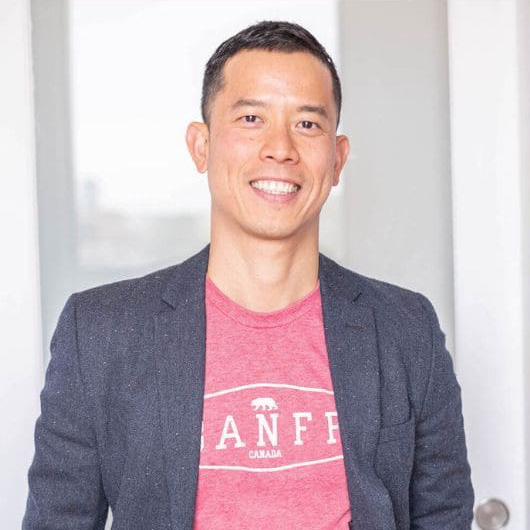
Guest Speaker
Eugene Woo
As an engineer with a passion for visual storytelling, Eugene recognized the challenges many faced in design. This inspired him to master infographics and subsequently create Venngage, a platform that empowers users to transform their ideas into vibrant visuals without any design experience.
Eugene is a seasoned entrepreneur with a passion for design, data visualization and software development. When he’s not spending quality time with his children, swimming or making coffee, you can find him inspiring others to become better communicators with the power of infographics.